Pre-rooted autoloaders v3
This update focuses on core stability rather than a massive overhaul.
What's New in v3
Scripting Support
bb10mt now supports native scripts for manipulating QNX6FS images, inspired by and partially adapted from Pablo Ferreira's BlackberrySystemPacker.
This eliminates the need to distribute pre-built autoloaders—you can now generate a custom autoloader for any supported firmware version yourself.
Note: AutoRoot v3 has been tested primarily on BlackBerry 10.3.3.3216. Full functionality on other releases is not guaranteed. Root execution on versions below 10.2.1 may not work.
Modified getroot.bar
getroot.bar has been modified to use /usr/bin/context substitution, allowing it to function as an autostart manager replacing its original purpose.
Optimized Startup
Several background services that consume CPU resources without providing essential functionality have been disabled.
This results in a leaner and more responsive system.
NVRAM Backup Management
NVRAM backup handling has been optimized to reduce storage usage.
AutoRoot now retains:
- The very first NVRAM backup
- The 3 most recent NVRAM backups
Older backups are automatically discarded. Backups placed at /accounts/1000/shared/downloads/nvram
term49
term49 is now installed only during the initial first boot, avoiding unnecessary work on subsequent boots.
System-Wide Root Access
Root privileges are no longer limited to SSH sessions.
Root access can now be extended to system-wide processes, using:
u_root__root
This functionality is disabled by default.
Special thanks to Stanley Williamson for the insight that made this possible.
SSH Disabled by Default
The SSH daemon (sshd) is now disabled by default for improved security.
SSH access can still be enabled during the build process if required.
Other
The files required for operation are now stored in /var/rootdata instead of /accounts/devuser/rootdata
Upgrade Without Reflashing
Supporters and contributors can request an upgrade script that allows upgrading an existing AutoRoot installation to v3 without reflashing the firmware.
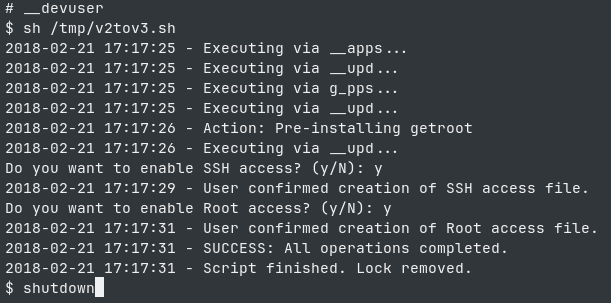
To update, copy the v2tov3.sh file to your device and run it using sh /path/to/file/v2tov3.sh
During the upgrade process, you will be asked whether root access is required and whether sshd is needed. After the script has run successfully, reboot the device to apply the changes.
Important Note for SSH/Root Users: If you are connected via SSH with root access, do not run the script directly as the root user. Instead, run it via the __devuser shell wrapper or add the script to pathtrust:
/proc/boot/pathtrust !/path/to/script/v2tov3.sh
Configuration
Before building AutoRoot v3, you can customize the installation using patch.txt.
Enable Root for Applications
To enable root access for applications such as term49, uncomment:
touch /var/rootdata/use.rootIn patch.txt:
-#touch /var/rootdata/use.root
+touch /var/rootdata/use.root
Enable SSH Access
To enable SSH access, uncomment:
touch /var/rootdata/use.sshIn patch.txt:
-#touch /var/rootdata/use.ssh
+touch /var/rootdata/use.ssh
Add Authorized SSH Keys
Default private key stored in id_rsa4x
If you want to use own ssh key(s), place your public SSH key(s) in:
patchdata/var/etc/ssh/authorized_keys2Then uncomment the following line in patch.txt:
push "patchdata/var/etc/ssh/authorized_keys2" "/var/etc/ssh/authorized_keys2"
chmod 644 "/var/etc/ssh/authorized_keys2"
chown 0:0 "/var/etc/ssh/authorized_keys2"
This allows the configured SSH keys to be used for authentication.
Persist SSH Host Keys
By default, SSH host keys may change after reflashing, causing clients to display a new host fingerprint warning.
To persist the host keys across firmware flashes, uncomment:
push "patchdata/var/etc/ssh/ssh_host_rsa_key" "/var/etc/ssh/ssh_host_rsa_key"
push "patchdata/var/etc/ssh/ssh_host_rsa_key.pub" "/var/etc/ssh/ssh_host_rsa_key.pub"
chmod 600 "/var/etc/ssh/ssh_host_rsa_key"
chown 0:0 "/var/etc/ssh/ssh_host_rsa_key"
chmod 644 "/var/etc/ssh/ssh_host_rsa_key.pub"
chown 0:0 "/var/etc/ssh/ssh_host_rsa_key.pub"
You can also replace these files with your existing SSH host key pair if you want to preserve the same fingerprint.
Building & Flashing
Build Process
Run the appropriate build script for your operating system:
- Linux / macOS:
root_v3.sh - Windows:
root_v3.ps1
The original autoloader filename must be provided as the first parameter.
The optional -c / --compress flag enables compression and can significantly reduce the final file size.
Linux / macOS
./root_v3.sh [-c|--compact] <path_to_input_autoloader.exe> [temp_dir]Windows PowerShell
.\root_v3.ps1 <path_to_input_autoloader.exe> [temp_dir] [/c]Installation
The build process produces two files:
_root_v3.exe
_radio.exe
Warning
_root_v3.exe contains only an image of the user file system.
Before flashing:
Make sure the target device is already running the official stock firmware corresponding to the version used to build AutoRoot v3.
1. Flash _root_v3.exe
Flash the generated root autoloader first:
_root_v3.exe2. Flash _radio.exe
After _root_v3.exe has completed successfully, flash:
_radio.exeThe correct order is therefore:
Stock Firmware
      │
      ▼
_root_v3.exe
      │
      ▼
_radio.exe
⚠️ Important Notes
- AutoRoot v3 is primarily tested against BlackBerry 10.3.3.3216.
- Compatibility with other BlackBerry 10 releases is not guaranteed.
- Root execution on firmware versions below 10.2.1 may not work.
- SSH is disabled by default.
- System-wide root access is disabled by default.
- Always use a build generated for the exact firmware version running on the target device.
- Keep a backup of important device data before flashing.
Download
lzo2.dll - this one works for me
Special thanks to everyone contributing to BlackBerry 10 research, reverse engineering, and preservation.