Some notes about BlackBerry 10 security
Currently, the website’s operation after May 11, 2026 is uncertain.
This content is intended strictly for educational and research purposes only. Commercial use without authorization is strictly prohibited!
The software and/or article ("the Product") is provided "as is," without warranty of any kind, express or implied, including but not limited to the warranties of merchantability, fitness for a particular purpose, non-infringement, or accuracy.
In no event shall the author(s), developer(s), or distributor(s) be liable for any claim, damages, or other liability, whether in an action of contract, tort, or otherwise, arising from, out of, or in connection with the Product or the use or other dealings in the Product.
The user assumes all responsibility for the use of the Product and acknowledges that the Product may not be error-free or appropriate for all purposes or environments. No advice or information, whether oral or written, obtained by you from the author(s) or through the Product shall create any warranty not expressly stated herein.
Use the Product at your own risk.
I would like to express my sincere gratitude to guizmox for his support! Thanks to him, I was able to continue this work in 2026 and finally obtain root access.
I am also extremely grateful to sw7ft, https://www.youtube.com/@sw7ft-tech.
If you want, you can support me via PayPal: oleksandr@e.email
Preparatory steps
The RAM-Loader command 0xF7 is used to write QCFM data to flash memory and also calculates the SHA-256 hash of that data. The 0xC040 (DO COMPLETE) command checks whether the QCFM data signature is valid and sets a flag that prevents the device from booting normally if the signature is invalid. However, since the flag is global, we can first flash modified data and then restore the original data to clear the flag.
Unfortunately, only the user partition can be modified. Because rfs_validator executable inside ifs-image checks validity of radio and os partitions. The integrity of the ifs-image is verified by the bootloader.
At the time of this research, only QNX provided full support for the Power-Safe (QNX6) filesystem. The Sachesi and DBBT utilities only support file and directory extraction. Therefore, I decided to develop my own library for read/write access to QNX6 images.
User partition contains "permanent" data for PPS and preinstalled applications. But unfortunately it mounted with nosuid flag.
RIM used multiple programming languages to build the BlackBerry 10 platform.
While trying to find a way to remove Amazon components, I came across the following piece of code:
barops_apk_install () {
   [ "$(PPS_VALUE /pps/system/perimeter/settings/1000-personal/policy 'policy_block_apps_install_other_sources')" == "1" ] && Info "APK install blocked by IT policy" && return
   [[ "$(PPS_VALUE_EXISTS /pps/system/perimeter/status 'corpliable_enterprise')" != "" ]] && Info "APK install blocked on corporate liable devices" && return
   local apksrc="${BASEFS}/usr/apk"
   for app in $(ls ${apksrc}); do
       if [ -e "${apksrc}/${app}/.aka" ]; then
           while read app_alias; do
               Info "If applicable, removig ${app_alias}"
               sud_uninstall_package $app_alias
           done < "${apksrc}/${app}/.aka"
       fi
       sud_is_permanent ${app}.andr
       local ret=$?
       if (( ${ret} == 2 )); then
           Info "Installing ${app}"
           cp -r ${apksrc}/${app} /var/android/
           echo "action::install_apk\npackage_location::/var/android/${app}\nextras::source::apk\n" > /pps/system/installer/upd/current/${app}
       elif (( ${ret} == 1 )); then
           cmp_version "${OS_VERSION}" "127.0.0.0"
           if (( ${?} == 2 )); then
               Info "Setting Permanent Flag for ${app}"
               sud_set_permanent_flag ${app}.andr true
           fi
       fi
   done
}
Here we see that unpacked bar files installed with "install_apk" command sended to an pps endpoint. And Amazon packages are unsigned as other system packages from /usr/hmi folder. After some more digging i found that code:
def _install_txn(self, txn):
    self._check_pkgname_unique(txn)
    olddn = getattr(self, 'dname', None)
    bar = txn.barfile()
    if txn['action'] != 'install_apk':
        try:
            bar.checksigs()
        except BarFileUnsignedError:
            if not self._is_debuggable(bar.manifest()):
                raise
Yes, bar signature checks is not performed for install_apk command.
Also, bar verification skipped for bar-files which Package-Id started with 'andrB' prefix. And no additional check is preformed to determine if package is really contain just apk. And thus we can make any type of package.
if not databar:
    bar = UnpackedBar(path)
    if 'Package-Id' in self and self['Package-Id']:
        packageId = self['Package-Id']
    else:
        mf = bar.manifest()
        packageId = mf['Package-Id']
    if not packageId.startswith('andrB'):
        bar.verify(register=True)
with uidgidcontext(uid=uid, gid=gid):
    if txn['action'] == 'install_apk':
        self._copy(txn['package_location'], path, umask=23 if not self._devmode else 7, progress=progress)
        self.enforce_perms(path)
    else:
        if bar.manifest()['Package-Type'] != 'patch':
            self._unzip(bar, path, umask=23 if not self._devmode else 7, progress=progress)
        else:
            self._patch(bar, path, umask=23 if not self._devmode else 7, progress=progress)
    if not self._is_sysdata() and not self._is_deviceconfig():
        self._create_hardlink(path)
        self._create_symlink()
    self._setup(path)
if self._is_sysdata():
    UnpackedSystemDataBar(path, linkroot=self._pfm.root).sysdata_prot()
Considering this we can build sysdata package which able to mount read-only qnx6 and rcfs images to arbitrary path.
So i make dummy python program to produce a multiple copies of binary (which set uid, euid, gid, egid and launch shell) with different uid, gid and suid, sgid attributes setted. Pack such files in rcfs image using mkrcfs utility from qnx sdk. And make an device-configuration type bar-file. Than made propper changes 'var' folder into qnx6 partition image. After flashing we are able to impersonate any user & group except root from devuser ssh shell.
Real root
The problem with the suid bit is that the system does not allow any file that is not added to pathtrust to be run as root. Fortunately for us, RIM has added Android subsystem files to the list of trusted files. There may be a simpler option, but for now I will describe the one I came up with first.
Then I launched the installed Amazon app. While it was launching, I simultaneously launched a user enumeration program and discovered that the epolld and logd processes belonging to the Android subsystem were running. These commands are called from the //apps/sys.android.gYABgKAOw1czN6neiAT72SGO.ns/native/scripts/start-android-core.sh
Additionally, I analyzed /apps/sys.android.gYABgKAOw1czN6neiAT72SGO.ns/native/sbin/android_launcher and found that it can install ANY symlinks. This led me to think that I could try to use a symlink to replace the file that runs under root with a file from the Android subsystem.
Earlier, I found that Deckard has a switchzone command that switches os1<=>os2, radio1<=>radio2, and calls the scripts /scripts/migration_logging.sh and /scripts/ota_info_pps.sh with root privileges.
/apps/sys.android.gYABgKAOw1czN6neiAT72SGO.ns/native/scripts/ls-oom-adj.sh did not seem important to me, so I decided to replace ota_info_pps.sh with it.
Since applications are only checked when the system starts up we can definitely can change their data.
So i add
ln -sPf /apps/sys.android.gYABgKAOw1czN6neiAT72SGO.ns/native/scripts/ls-oom-adj.sh /base/scripts/ota_info_pps.sh
into start-android-core.sh
and [codesh lang="bash" slay qconn /base/usr/sbin/qconn port=9090
[/codesh]into ls-oom-adj.sh
After that, I launched Amazon again and saw that the symlink had been created! All that remains is to check whether qconn will run as root. To do this, I run __upd and obtain privileges to write to /pps/system/installer/upd/current. Then I execute:
echo "@sz\naction::switchzone\nsession::0\nzone:json:{\"radio\":\"true\",\"os\":\"true\"}\n" > /pps/system/installer/upd/current/sz
I check and see that qconn has started with root privileges!
Using this method, I successfully downloaded and launched telnetd, which allowed me to continue exploring the system in a more convenient way.
07.02.2026 - PathTrust successfully unlocked

21.02.2026 - The patch implementing the MMC_IOC_CMD analogue for the mmc driver is finally ready, and the EMMC firmware has been successfully retrieved. 
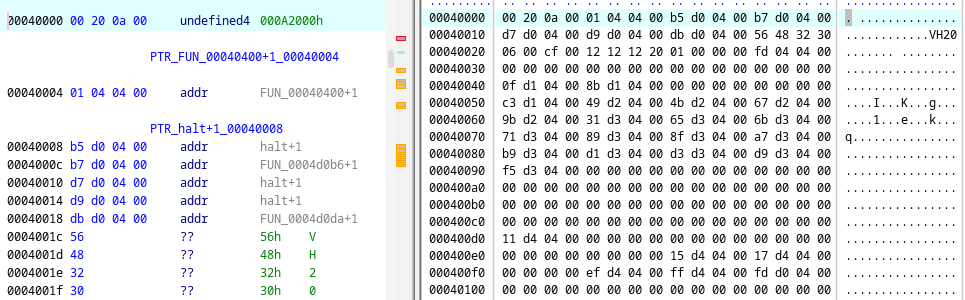
09.03.2026 - Autostart for user scripts and, accordingly, automatic root acquisition have been achieved.
12.03.2026 - The test phone was killed by accidental MCT + NVRAM overwrite.
16.03.2026 - Public updates to the project have been suspended due to a lack of interest and feedback.
20.03.2026 - To disable the installation of Amazon and the Amazon Appstore, you need to create the file /var/pps/system/perimeter/settings/1000-personal/policy with the following content:
@policy
policy_block_apps_install_other_sources::1
other
launcher does not perform verification if the manifest is located on rcfs.
void is_RCFS(int fd)

{
  int ret;
  int iVar1;
  statvfs64 stat;

  iVar1 = *(int *)PTR___stack_chk_guard_109fbc00;
  ret = fstatvfs(fd,(statvfs *)&stat);
  if (iVar1 == *(int *)PTR___stack_chk_guard_109fbc00) {
    return;
  }
  __stack_chk_fail(ret == 0 && stat.f_fsid == DWORD_109fca20);
}
iVar1 = fstat(mft_fd,auStack_70);
if (iVar1 == 0) {
  app_ctx->field1544_0x608 = local_50;
}
if (1 < *(int *)PTR_log_verbosity_109fbd70) {
  msglog(6,"%s: reading BAR manifest",pcVar5);
}
iVar1 = is_RCFS(mft_fd);
if (iVar1 != 0) {
  app_ctx->trusted = app_ctx->trusted | 1;
}
Analysing next piece of code and using prior knowledge
if platform.system() == 'QNX':
    if platform.processor() != 'x86':
        winchester2 = True
        for m in platform.machine().split('_'):
            if winchester_match.match(m):
                winchester2 = False
                break

        if winchester2:
            name = 'winchester2'
        else:
            name = 'winchester'
        try:
            exec('import deckard.platform.%s' % name)
            config.set('platform', 'module', name)
        except ImportError:
            warnings.warn('unable to load %s' % name)
            raise

        config.set('installer', 'module', 'signed')
    else:
        config.set('platform', 'module', 'simulator')
        config.set('installer', 'module', 'unsigned')
else:
    installer_module = 'signed'
    if os.getenv('SWCFG_ALLOW_UNSIGNED_APPS', 'false') == 'true':
        installer_module = 'unsigned'
    config.set('platform', 'module', 'dummy')
    config.set('installer', 'module', installer_module)
config.read('/etc/system/config/sud.cfg')
we can make /etc/system/config/sud.cfg looks like:
[platform]
module = winchester2

[installer]
module = unsigned
which should skip bar verification.
Addons:
- BlackBerry 10 MultiTool alpha(v0.5.9.999) 04.01.2026
- BlackBerry 10 MultiTool (v0.5.0.5) 03.09.2025
- BlackBerry 10 MultiTool (v0.2.1.3) 24.07.2025
- BlackBerry 10 MultiTool (v0.1.0.10)
- BB10 downgrade tool with src
- asroot src
- ramloader cmds
- RSA signature forge tool (PoC)
- PathTrust unlocker(8960 10.3.3.3216)
- Disable BAR verification for launcher (8960 10.3.3.3216)
- Disable BAR verification for launcher (universal)
- emmc firmware
- emmc driver patcher + emmc fw reader
Bibliography: